Author: Dave Biggs

  • [CONFERENCE] Presentation – AMPO 2015

    [CONFERENCE] Presentation – AMPO 2015

    I recently gave a presentation “Go Viral – Best Practices for Online Public Engagement for MPO’s” at AMPO 2015, the annual conference for the Association of Metropolitan Planning Organizations. We had a great time in Las Vegas speaking with MPO staff and public communications experts.

    Above you’ll find a recording of my presentation, and you may also view a copy of the slides here.

    Below you’ll find the full panel presentation in its entirety. This was a session called “Public Involvement – Part 1” and featured myself, Lorna Parkins from Michael Baker International, James Rojas from Place It and Shelley Whitworth from H-GAC.

  • [WEBINAR] Best Practices for Online Public Engagement for Transportation Agencies

    [WEBINAR] Best Practices for Online Public Engagement for Transportation Agencies

    This 42-minute video presents a series of case studies, best practices and tips to guide MPO’s and DOT’s towards the successful application of online public engagement for a variety of projects. Award-winning LRTP, STIP, TIP, NEPA, EIS, corridor, highway, transit, TOD and participatory budgeting projects that successfully leveraged innovative digital engagement are presented. From crowdsourcing platforms to interactive surveys to social media, the latest fleet of online engagement tools are making it so easy and fun to participate that they are drawing in thousands of participants and collecting constructive public input to inform and support MPO and DOT projects across the country. This session outlines best practices gathered based on hundreds of project case studies.

    Watch Recording

    View Slides

    Q&A

    Below are some of the questions that were asked during the Q&A session at the end of the presentation.

    Q: What are the best methods you have heard of for getting the survey in front of people so that they will share it?
    A: From my perspective there are two aspects of this question. First, how do you make people aware of the survey and second, what can we do to encourage them to then share it with their contacts? Both of these questions are addressed in our Public Involvement User Guide. Inside you will find a section on effective methods for promoting participation and many insights into how to develop surveys that people want to share. This is the key! That, and making it easy to share with one click which is incorporated into all MetroQuest sites.

    Q: What is the typical participation rate through kiosks vs. other screen types?
    A: The participation rate for kiosks depends in small part on the branding and call to action stickers on the front (which we can advise you on) and to a much greater extent on where they are placed. We have found that places are where people are not in a great hurry are best: libraries, recreation centers, etc. We’ve seen participation rates as high as 200-500 participants per day in the best cases though 50-100 per day is more common. Here are the platforms we support and a rough estimate about what percent of participation you can expect from each: computer 50%, smartphones 30%, kiosks 15%, face to face 5%. Our Public Involvement User Guide provides advice on developing a multi-pronged engagement strategy that fits your project goals.

    Q: Has this been used in Washington State?
    A: Yes, MetroQuest is the most widely used online engagement platform in North America so there are case studies in most regions. In Washington State most recently we worked on the Street Funding initiative for Vancouver, WA. It’s an interesting site that combines the scenario, priority ranking and funding balance screens in an interesting way. Feel free to check it out here.

    Q: Is there a particular age demographic that this appeals to?
    A: MetroQuest is designed to appeal to the broadest demographic possible. Several of our clients have done detailed analysis on the participation by age group and compared it with the mix in the general population and each time the share of participation has been within 10% of the region’s population with one exception: youth. It used to be that seniors were the most difficult to engage online, but that has changed dramatically in the last 3 years. Here is a blog post about engaging seniors if you are curious. People under 25 that can be difficult to reach. They have no problem with the technology, but their minds are simply not on planning. If engaging youth in large numbers is critical to your project it may be necessary to go to events where young people will be and encourage them to engage using tablets or their own smartphones. We can help you set up tablets with MetroQuest for use in this capacity. It’s pretty easy but does require someone to take the time to find events and set up a table.

    Q: What are the cost for using MetroQuest? What is the cost for each additional language?
    A: MetroQuest is provided either as a subscription or for use on a project as a package. To support a project here’s the process and what’s included:

    1. The MetroQuest team collaborates with you (via a web meeting) to determine which of the MetroQuest Screen Types will be the most effective to use on the project.
    2. MetroQuest then provides a template for you to place content (text, images, etc) to populate the screens.
    3. MetroQuest does all the technical heavy lifting and sets up and refines the MetroQuest experience with your feedback.
    4. Once the software meets your approval, MetroQuest performs a suite of technical and user experience testing to ensure the software runs properly on all browsers and smartphones, and is accurately collecting and organizing participant data.
    5. Once MetroQuest is launched it is available for public use for up to 3 months. We’ll offer tips on how your team can promote participation and train you in the use of our MetroQuest Insights dashboard where you can monitor activity and analyze the data.

    The fee for this standard package of software use and related services is $12,000. If you need to support additional languages they can be added for $4,000 per additional language. If you plan to use MetroQuest on multiple projects we would be pleased to discuss subscription pricing options to reduce your costs. Contact us to discuss your needs.

    Q: Will a recording of this presentation be available to rewatch?
    A: Yes, the recording is provided above and you may feel free to rewatch it or share it with others. Thanks in advance for helping to spread the word about online engagement. It’s very gratifying to help so many agencies improve their outreach.

  • [WEBINAR] Best Practices for Online Engagement for MPOs

    [WEBINAR] Best Practices for Online Engagement for MPOs

    This 45-minute video presents a series of case studies, best practices and tips to guide MPO’s towards the successful application of online public engagement for a variety of projects. Award-winning LRTP, TIP, NEPA, EIS, corridor, highway, transit, TOD and participatory budgeting projects that successfully leveraged innovative digital engagement were presented. From crowdsourcing platforms to interactive surveys to social media, the latest fleet of online engagement tools are making it so easy and fun to participate that they are drawing in thousands of participants and collecting constructive public input to inform and support MPO projects across the country. This session outlines best practices gathered based on hundreds of project case studies.

    Watch Recording

    View Slides

    Q&A

    Below are some of the questions that were asked during the Q&A session at the end of the presentation.

    Q: How do you reach out to the target public?
    A: We’ve written two blog posts with best practices on promoting participation and reaching targeted populations (e.g. Environmental Justice). I hope they are useful. If there are specific groups you’d like to reach, please let us know and we’ll be happy to advise you on what we’ve seen work best.

    Q: We like the project “voting” in the Lee County example – how do you monitor multiple votes from one stakeholder group?
    A: Yes, I love the Project Selection screen. It’s a great way to collect public input on transportation projects. In each of our surveys we include questions at the end which allow you to determine how many people from each stakeholder group are participating. Using this data you can ensure that no one group is over or under represented. In addition, as I mentioned during the webinar, MetroQuest also has ways of ensuring that individuals are not able to vote numerous times in an attempt to skew the results. Check out some of our most popular screen types.

    Q: For the Lee County MPO, how much staff time was required to set up the interactive website?
    A: The staff time required varies a bit depending on which screen types are selected. In general, we’ll work with you to determine how to make the best use of material that you already have or are planning to develop for other purposes so that generating the content for MetroQuest is not a great deal of additional effort. We’ve found the range to effort to be 1-3 days of staff time spread out over a few weeks. See below for more about the development process.

    Q: Will the slides be available after the presentation?
    A: Yes, see the link above.

    Q: What is the approximate cost to create and maintain an online survey?
    A: MetroQuest is provided for use on a project as a package. Here’s the process and what’s included:

    1. The MetroQuest team collaborates with you (via a web meeting) to determine which of the MetroQuest Screen Types will be the most effective to use on the project.
    2. MetroQuest then provides a template for you to place content (text, images, etc) to populate the screens.
    3. MetroQuest does all the technical heavy lifting and sets up and refines the MetroQuest experience with your feedback.
    4. Once the software meets your approval, MetroQuest performs a suite of technical and user experience testing to ensure the software runs properly on all browsers and smartphones, and is accurately collecting and organizing participant data.
    5. Once MetroQuest is launched it is available for public use for up to 3 months. We’ll offer tips on how your team can promote participation and train you in the use of our MetroQuest Insights dashboard where you can monitor activity and analyze the data.

    The fee for this standard package of software use and related services is $12,000. If you need anything else (additional languages, extended periods of use, etc) we’ll be pleased to discuss your needs if you have a project on your radar.

    Q: Does MetroQuest integrate with electronic keypad voting systems for stakeholder group participation?
    A: Yes, MetroQuest has been used frequently with keypad polling systems in a workshop setting. It’s a great way for everyone to contribute equally (even the shy ones).

    Q: Is Spanish translation automatically included in the MetroQuest survey?
    A: Spanish or any other language support is available as an option. We do not use or recommend tools that rely on automatic translation since they often get things wrong, especially with planning options and concepts. Because there is not a great deal of text on the screens in MetroQuest, the translation task is not too time consuming to do manually and we have found that it pays off to get it right.

    Q: How does MetroQuest integrate with Facebook and Twitter?
    A: MetroQuest is integrated with Facebook, Twitter and other social networks via our sharing widget. People seem to like encouraging their network to participate on social networks so we have incorporated a one click system that allows them to spread the word quickly on the network of their choice. As a client, you’ll have an opportunity to write the default content that goes out so even if people don’t write their own post, what they share will convey your call to action in your own words. This has proven to be a very powerful mechanism to generate participation since people are much more likely to pay attention to someone they know and trust.

    Q: Who do you consider to be your competitors and what do you do better than your competitors?
    A: This is a big question but I’ll do my best to answer it. There are three “competitor” categories.

    1. Business as usual

    Our biggest competition is “business as usual” or not using online engagement at all. While the use of online engagement has been growing quickly, there are still many agencies that are slow to start. I spend some of my time demystifying this new world and allaying fears that it will bring in more opposition. We’ve found repeatedly that the easier we make it to participate, the more support agencies hear from people.

    1. Multiple choice survey tools

    In the online engagement world, there are tools like survey monkey that allow for multiple choice surveys to be presented online. While we don’t think anyone who sees what we do would compare us to a multiple choice survey, they both are technically online survey tools. What do we offer that is superior to online survey tools: a fun and visual interface that people are excited use and share with friends (quantity) and educational exercises that teach people about complex choices before they are asked to weigh in (quality).

    1. Crowdsourcing tools

    On the other end of the spectrum is crowdsourcing tools like Mindmixer that ask people for their ideas and other members of the community weigh in on those ideas. These tools, by their nature, require people to register and encourage people to come back repeatedly to see how their ideas are doing. This activity is appealing to a smaller group of highly motivated citizens (10x lower quantity) and generates input that can be difficult to quantify or ideas that are not practical (lower quality)

    [Mindmixer is no longer available and the organization that created it has focused on another direction. I believe there are other software options still available but their use by agencies is declining.]

    I know you asked me talk about what we do better but I don’t like to sound critical. I believe that there is a role for a variety of tools. I believe that MetroQuest is the best platform for engaging a large audience from a broad demographic and collecting informed and actionable input. This is not by accident – we asked agencies what they wanted to achieve and have focused all our energy towards those objectives.

    Q: What do you recommend for very small MPOs–staffs of one or two–who can barely eke out the time to do the basics? Small MPOs can’t always hire consultants…
    A: I recently gave a presentation at the TRB conference for Small and Medium Sized Communities on this topic and I understand the limitations smaller agencies are facing. Most of our clients in smaller agencies use MetroQuest directly and seldom hire consultants. A number of smaller agencies have turned to online engagement as a way to reach more people with less staff resources compared with public meetings. Of course this only works if you are able to reduce the number of public meetings. We’ve found that the cost of online engagement is often equal to or less than the total cost for planning and hosting a single public workshop. As I said in the webinar, many of the smaller MPO’s are in rural areas that are very spread out and it can be difficult to get people to travel long distances to attend public meetings so online options can be helpful.

  • [CONFERENCE] Presentation – TransComm 2015

    [CONFERENCE] Presentation – TransComm 2015

    I recently gave my presentation on “Going Viral – 8 Best Practices in Online Engagement” at TransComm 2015, the annual meeting for the American Association of State Highway and Transportation Officials’ (AASHTO’s) Subcommittee on Transportation Communications. We had a great time in Annapolis speaking with transportation professionals and public communications experts.

    Above you’ll find a recording of my presentation, and below you’ll find the entire one hour panel presentation in its entirety. This was a session called “Going Digital & Engaging Citizens: Embracing Change” and featured myself, Andy Boenau from Timmons Group and Stephanie Brooks from Michael Baker International.

  • [CONFERENCE] “Going Viral – 8 Best Practices in Online Engagement” – Highlights from IAP2 2015

    [CONFERENCE] “Going Viral – 8 Best Practices in Online Engagement” – Highlights from IAP2 2015

    We had such a great time at the International Association for Public Participation (IAP2) 2015 conference in Portland this month. It’s always great to present to an audience of public engagement experts. The Q&A was a highlight for me – great questions and dialog! My presentation “Going Viral – 8 Best Practices in Online Engagement” was recorded and this fast-paced 7-minute highlight reel was prepared. Grab a coffee and enjoy!

    Below you’ll find the entire one hour panel presentation in its entirety. This was a session called “Changing the Story: Digital Engagement Transforming Transportation Outreach” and featured myself, then Stephanie Brooks from Michael Baker International and finally Tim Watkins from the San Bernardino Associated Governments.

  • [PRODUCT] Announcing MetroQuest Insights

    [PRODUCT] Announcing MetroQuest Insights

    A New Window into Your Public Input

    The MetroQuest development team has been busy this summer making many improvements to our community engagement software platform. We’ve been listening to the needs of our clients and over the past few months we’ve completely revamped the way our clients get the results of their public engagement.

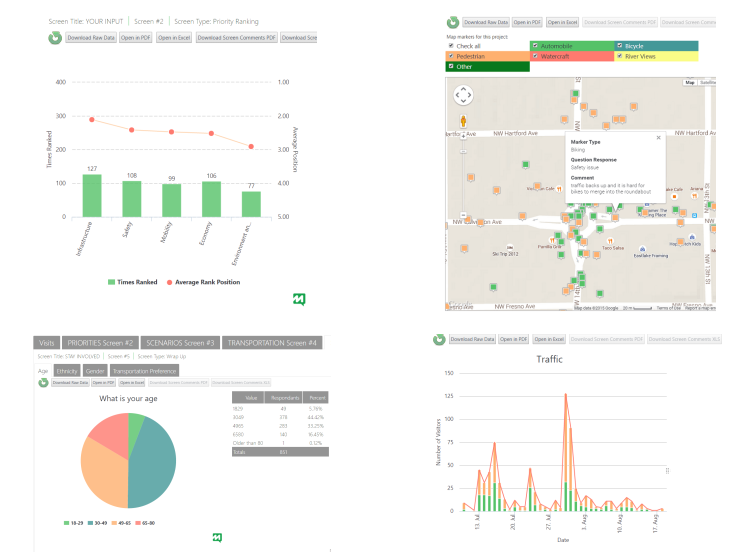
    Introducing MetroQuest Insights, an intuitive dashboard to monitor, evaluate, report and export your public input. MetroQuest Insights allows you to visualize the results through colorful graphs and maps, summarize the findings, break the results down by demographic group and even export the data in specially formatted spreadsheets to allow maximum flexibility.

    With MetroQuest Insights you can:

    Monitor: Stay on top of traffic with an intuitive dashboard

    • Monitor public participation in real-time
    • Breakdown the results by demographic group
    • Compare your web, mobile and kiosk traffic

    Evaluate: Easily explore public input

    • View visitor preferences, ranking and ratings in real-time
    • See graphs, maps, tables and comments tailored for each screen
    • Easily identify data – no more complex variable names

    Report: Get instant visualizations

    • View maps and graphs of results on-screen
    • Customize your visualizations to show only the most relevant data
    • Get colorful graphics suitable for cutting and pasting

    Export: Dive into detailed data for final reports

    • Create and download customized tables and graphs
    • Download a complete table of all your results for detailed analysis

    We think you’re going to love MetroQuest Insights. You’ll save time and money and dive deeper into your public input than ever before. MetroQuest Insights is ready for your next project!