With an increased focus on inclusivity and achieving broad community engagement, our team is excited to announce a recent product enhancement to the MetroQuest survey software that aims to help planners achieve more diverse public participation and engage with a broader audience online.
Translating MetroQuest surveys – a new, streamlined approach.
When seeking inclusive, broad-based public engagement for planning, it’s important for planners to find ways to reach out to and connect with community members who don’t utilize English as their primary language. Depending on the make-up of the community, this can sometimes entail creating several different language editions of your survey and promoting them to targeted groups through different communication channels and campaigns.
The option to translate MetroQuest surveys into a variety of additional languages is a feature that has been around for a while. Historically, our Customer Support team was heavily involved in the process. With the objective to make this more efficient and less time consuming, we recently made a series of enhancements to MetroQuest to better support the translation process.
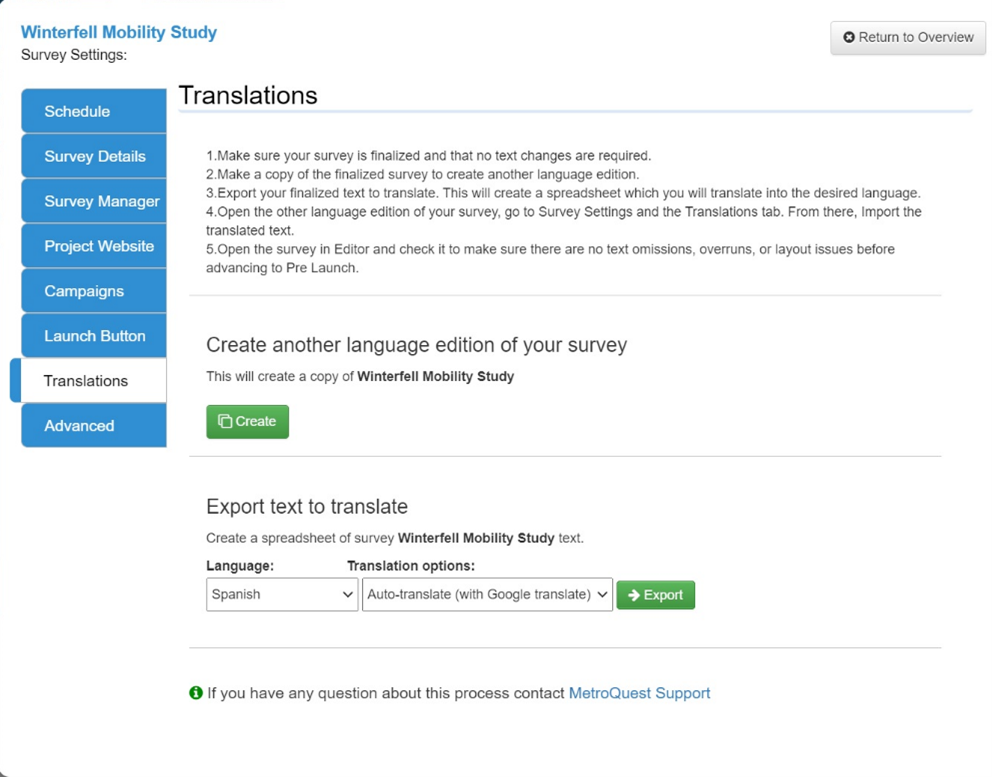
Now, when your team is in MetroQuest Studio, they will see a section dedicated to Translations and find all the information they need to facilitate a translation of any survey.
After creating a replica of your primary language survey and selecting the target language, confirming the new survey title and the launch and end dates of your new language edition, your team will be prompted to export the text to translate into the language(s) of your choosing. The next step, translating the text, can be done using our new Google Translate integration! Once the translation is complete, the translated text will be imported to your new language survey. At this stage, our Customer Support team will work with you to ensure your survey is ready to go before progressing past Pre-Launch.
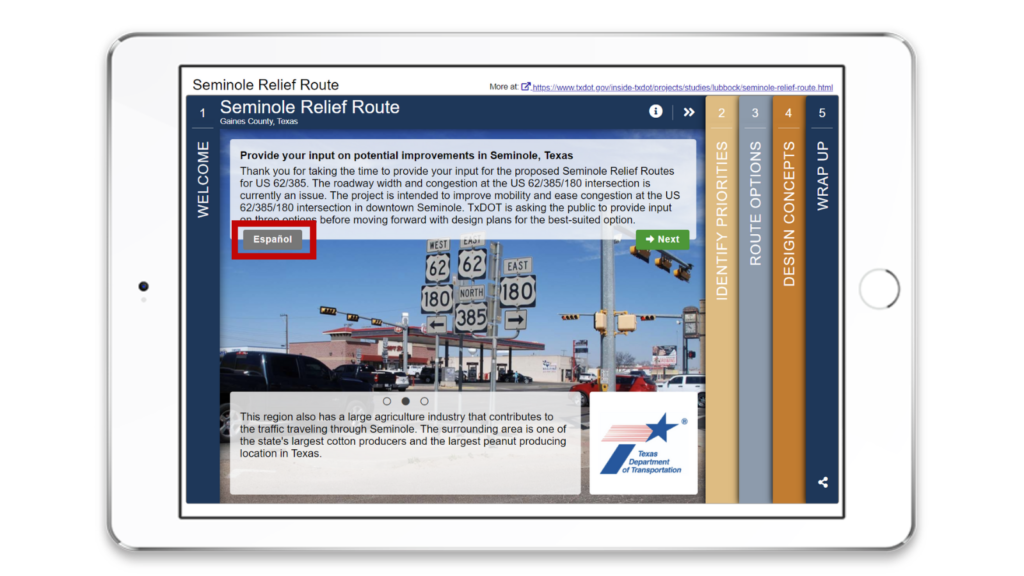
Once you have a finalized edition of your survey in another language(s), a button – or buttons – will automatically appear on the Welcome Screen of your survey where participants can navigate to the survey of their choosing. Here’s an example:
We believe that everyone has a voice, and that together, we can plan better, more sustainable, and inclusive communities. MetroQuest’s mission is to deliver great online public engagement experiences that broaden outreach and bring people together to plan more livable places and move more people. With this enhancement, we hope to enable planners to work towards achieving that goal!
I recently had the privilege of virtually connecting with Hugh Conroy, the Director of Planning for the Whatcom Council of Governments (WCOG). They’re a federal and state-designated regional planning organization located in Bellingham, Washington and a new MetroQuest subscriber!
The agency has had great community engagement success with us, and I wanted to touch base with Hugh to learn more about their transition to online engagement, their remarkable MetroQuest survey and the impressive comprehensive promotional strategy they created to help achieve high levels of online engagement.
Read on for an inside scoop on my conversation with Hugh…
Can you tell me about Whatcom COG and the types of projects you’re currently working on?
We’re a small US metropolitan planning organization (MPO) serving a population of about 225,000. As the federal recognized MPO and state designated regional transportation planning organization (RTPO), we’re responsible for managing the region’s long-range transportation plan and undertake a variety of other transportation planning and programming activities.
We’re currently updating the region’s long-range transportation plan. While the last two plan updates have included public input and review opportunities, a more dedicated regional assessment of the public’s transportation investment priorities hadn’t been conducted since 2001.
“As part of the continuous planning process, we saw the need to begin the 2022 update with a higher profile effort that would allow us to take stock of how our community’s goals for transportation investments may have changed over the last 20 years.”
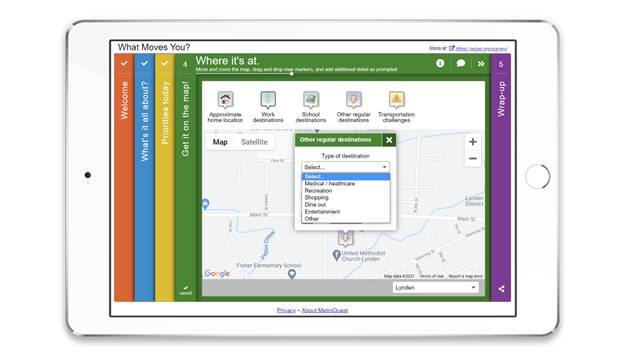
We used MetroQuest to launch our 2021 Whatcom Transportation Survey for this project, which gives the public an opportunity to weigh in on our region’s long-range, 20-year transportation plan.
Can you tell me about Whatcom COG’S journey from traditional public engagement strategies to online tools and tactics?
I wouldn’t say it was so much a transition as an addition to what we’ve done in the past. As a metropolitan planning organization, we have ongoing public engagement activities related to publication of plans and actions of the regional Transportation Policy Board. With our main, 20-year plan update coming up next year, we wanted to take a bigger leap into broader public engagement and looked at online tools to do so.
“I think a combination of things made it really obvious that an online platform as our primary public engagement mode would be the way to go.”
We’d already done some of that on a smaller scale using tools like Google Forms and COVID-19 definitely limited what we would do in terms of face-to-face meetings and attending community events.
The option to leverage the relative ubiquitousness of internet-connected devices pointed to an engaging online platform like MetroQuest and proved to be a great fit with our goal of hearing and recording feedback from a much wider audience than we’ve connected with in the past.
Why did the organization decide to use MetroQuest for this project? What kind of impact has the transition had?
We looked at a variety of online platforms and surveys, but knew we wanted to have a mapping component. Not only is the extra richness of the resulting mapping information attractive for our team, but I think respondents have more fun and feel find that giving input about specific geographic locations is a lot more satisfying.
The survey is still open to the public, and we’ve already engaged 1,845 participants online! This is a drastic difference between the amount of public input we collected back in 2001.
“The 2001 Whatcom Regional Transportation Summit convened roughly 120 community members, compared to our MetroQuest survey that has reached nearly 1,900 participants and still growing.”
“At the end of the survey, participants are given the option to share their email address so that we might ask them a couple of follow-up questions and notify them when the survey summary report becomes available. So far, over 600 individuals have shared an email address which, if managed carefully, could be an important resource for some ongoing public engagement.”
WCOG developed a comprehensive promotional strategy to help increase its public engagement numbers. Can you walk us through some of the promotional tactics you used?
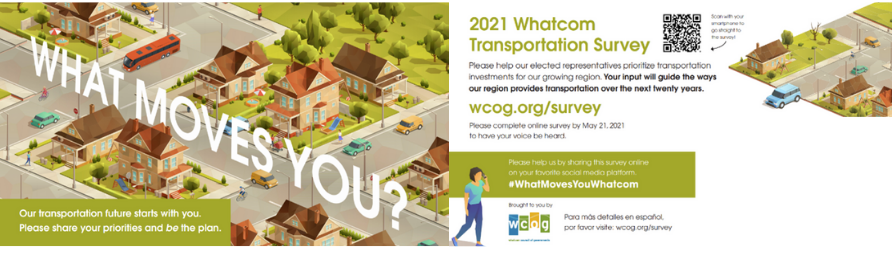
After completing a regional household travel survey four years ago, we were familiar with the effectiveness of old-fashioned mail. We worked with a graphics professional to design a postcard and worked with a mailing service to help ensure the postcard, which was randomly mailed to 40 percent of all households, was equally distributed within the region’s local jurisdictions.
Whatcom COG What Moves You Postcard
“We generated distinct URLs to track where people were coming from and, so far, the bulk of our responses have been generated from our postcard initiative.”
We also leveraged the in-house marketing expertise of our transportation demand management program, known as Whatcom Smart Trips, to assemble a press kit for print and radio media and partner agencies to announce the survey effort through the publications and websites they manage. We used our project website and social media accounts to advertise the survey. We’re also currently working on a second press release to help drive more engagement towards the end of the survey period.
Any tips for agencies and firms looking to reach their target demographics?
On the mail carrier routes in census areas at or below the metrics we use to track low-income or ethnic minority households, we mailed a postcard to 100% of the households in those areas to help us reach a more diverse audience and hear from traditionally underrepresented groups in our community. If you’re using mail and don’t have funds to mail to every single home, I recommend a mix of randomized selection approach and targeted saturation to increase the potential for hearing from traditionally underrepresented community members.
Congratulations to Hugh and the entire team at WCOG! We’re so impressed by your community engagement efforts and look forward to seeing the survey’s final results in the coming weeks.
This blog was originally published on November 19, 2014.
Whether or not your community is familiar with public engagement, improving the overall experience of filling out an online survey or taking part in a public meeting can make it easier for community members to take part, and help establish a culture of trust.
We’ve identified five questions that participants often ask practitioners and 21 corresponding tips to help you can use to help enhance the public’s online experience and your public engagement results! Let’s get started…
Question 1: “How long will this take?”
In the digital age, attention spans are shorter and there’s more and more taking up our time. Aim to keep the online engagement process short for participants.
Tip #1: Get people started in 10 seconds or less. Avoid complicated instructions or registration pages where participants must create an account in order to participate. If you’re using something like Zoom for online public meetings, send out links with the password embedded!
Tip #3: Show people what’s at stake and how their input will be used.
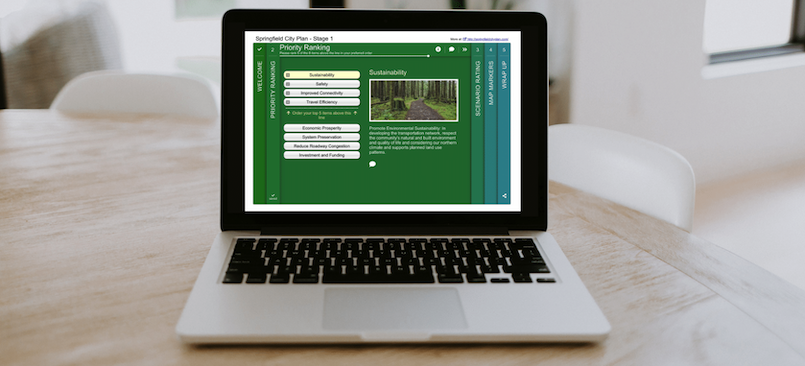
Tip #4: Start with the right question. At MetroQuest, we’ve found that asking people to identify their priorities is one of the most engaging ways to start. Check out one of our priority ranking screens to see for yourself how you can do that in a survey!
Tip #5: Start engaging early on in the planning process. People want to weigh in before decisions have been made.
Tip #6: When collecting input, create a sense of urgency. Let people know that there is a limited time for them to provide their input.
Question 2: “What’s in it for me?”
People are self-interested. Your calls-to-action, branding and content must draw people in.
Tip #7: Test out different calls-to-action. Different demographic groups will respond to different messaging. The different channels you use can have an impact as well.
Tip #9: Connect with people emotionally. Stories and images are more powerful than words and statistics.
Tip #10: When asking participants to identify priorities, highlight the pros and cons of each and help them link it back to their own experiences.
Tip #11: Give people input opportunities that matter to them and their community. Think about what kind of input people might want to get off their chest and give them a safe and accessible way to share it.
Tip #12: Understand sharing on social networks. Develop visuals, messaging and an experience that people will be proud to promote, and that others will like, leave comments on, or share.
Question 3: “Am I comfortable with this?”
When providing input, individuals may feel intimidated or reluctant to share their real thoughts. Try to make the online engagement experience safe and comfortable for participants.
Tip #13: Ensure that your questions are clear so that participants understand exactly what’s being asked of them. Use simple language, avoid jargon and make sure that the process to provide input is straightforward and simple.
Tip #15: Don’t allow for grandstanding or bullying. People are more likely to share their true views and opinions if they feel safe and know their ideas won’t be challenges or ridiculed online.
Question 4: “Can you help me with this?”
Planning issues can be intimidating, and many people don’t feel qualified to register an opinion. It’s important to help people learn in a way that doesn’t turn them off.
Tip #16: Ask questions that people feel qualified to answer. Everyone knows what they like and dislike and what priorities are most important to them in their community.
Tip #17: Allow people to discover insights for themselves by embedding learning in the experience. For example, a budget allocation exercise can help inform participants that funding for the project is limited.
Tip #18: Educate before asking for opinions to ensure the public is well-informed about the project. By providing context, you help to ensure that participants provide you with educated input and knowledgeable answers to the questions being asked.
Question 5: “I’m in a rush. Do I really need to finish this?”
For people in a rush, i.e., 95% of participants, it’s important to work hard to get them to finish a survey and answer as many questions as they can.
Tip #19: Leverage people’s curiosity and sense of accomplishment. Share graphics of survey results, and show the community how their input was used.
Tip #20: Ask for personal information at the end, rather than at the beginning. People are much more willing to provide this information at the end of the engagement experience, when they’re already invested in the project.
Tip #21: Prizes work! Offer something of value, such as a chance to win a tablet or gift card, to encourage more people to participate.
Over to you. What insights do you have that could help improve online engagement?
For the fifth consecutive year, MetroQuest has been recognized as a top information and communications technology (ICT) company by the ‘Ready to Rocket’ award. Thank you Rocket Builders!
“Each year when we choose the Ready to Rocket companies, we are looking for those companies that have best matched technical innovation with market opportunity. MetroQuest is an excellent example of the right technology for the right customers at the right time.” — Reg Nordman, Managing Partner, Rocket Builders
We’re delighted and thankful to be recognized. Especially in light of the challenges of a global pandemic, the team has worked tirelessly and with grace and aplomb. In 2020, we were pleased to release the newest iteration of our flagship online survey platform: MetroQuest 2020.
“Public engagement for planning has been moving online for years. With this latest release, the MetroQuest team is excited to provide an efficient and flexible online survey platform suited for a wide range of planning projects.” — Mike Walsh, CEO, MetroQuest
This release marked a significant update to the MetroQuest platform, incorporating feedback from client partners and early adopters of MetroQuest 2020. The new version supports additional customization, a simpler way to create surveys and updated user processes.
In addition, MetroQuest saw an increase of 85% in industry interest over the course of the last 12 months. With regular webinars featuring speakers from agencies and firms across the country, MetroQuest has solidified its place as an industry leader, linking organizations with the technology they need to engage communities online broadly and meaningfully.
Thank you to Rocket Builder for recognizing the accomplishments of our world-class team. We’re excited to continue forward and achieve transformative advances for public engagement with the MetroQuest platform!
Want to see if MetroQuest is right for your organization? Contact us!
This blog was originally published on March 25, 2015.
The wide array of online public engagement tools available today provide planners with a plethora of ways to reach out to their communities and gather more informed public input.
But what’s the true payoff of online engagement? Here are some of the most common things we hear from customers about the return-on-investment (ROI) of online community engagement:
Gain a broader reach by including the voices that would typically remain silent
Public meetings have set meeting times and locations, making it inconvenient for most people in your community to attend. Plus, those with a strong negative opinion are typically the most willing to go out of their way to show up at public meetings, filling most community workshops with naysayers instead of being a true representation of broad public opinion.
Online community engagement provides the average citizen who is unable to attend public meetings, or who would otherwise remain silent at face-to-face events, a chance to participate and provide their feedback in a very safe and private way. By making the engagement experience more accessible and a lot less intimidating, you’ll increase your level of engagement as well as the diversity of the people you hear from.
Uncover what the public truly wants and values
With traditional outreach, you rarely hear from the open-minded moderates in your community. While you may have a perceived notion of what they want, you might be surprised what the broader public actually thinks.
The Hillsborough Metropolitan Planning Organization in Florida assumed that the majority of their local community was in favor of the current state of the downtown area – urban sprawl with no major density downtown where most people commuted. This assumption was based on what they were used to hearing from the “public” at traditional workshops and in-person meetings. After making the switch to online engagement and using MetroQuest to obtain over 9,575 survey responses from a broad demographic, the results indicated that over 80% of the community was actually in favor of a much more densely populated downtown core with extensive public transportation options and support for cyclists.
Don’t base your decisions on the loud minority in your community.
Save time on plan approvals and implementation
By obtaining more informed and meaningful input from a larger and more diverse portion of the community, projects have greater community acceptance and get approved a lot quicker.
Before transitioning to online engagement, Paul Kraehling, a planner at the City of Guelph, was familiar with facing opposition when it comes to planning projects. His department used to deal with many costly appeals during major planning proposals. After making the switch to online and using MetroQuest surveys to facilitate their engagement, their team was able to collect more robust, informed public data from a much wider audience. And for the first time in their history, they received no appeals from the Municipal Board. This subsequently led to an increase in the speed and efficiency of getting their plan underway as they could move to the implementation phase immediately after.
Avoid false starts and failed plans
The harsh reality is that some projects outright fail. A city might spend tens or hundreds of thousands of dollars creating a plan, only for the plan to fail for lack of community or political support. The plan may have initially been given the go ahead, but somewhere between approval and implementation, it got overturned or stopped by community resistance. Not only is a plan that is doomed to fail a huge waste of taxpayers’ funds, it’s also very costly in terms of political “capital”.
With more robust public data from online community engagement, planners are better equipped to uncover hidden issues and build real community support before moving forward.
Build community trust
Time and time again you can read reports about public agencies that suffer from poor reputations in their communities. These bad relationships between the agencies and the public make it more difficult to get projects done.
Compared to traditional outreach, online community engagement provides the public with an accessible way to participate, making them feel more heard and valued, leading to a greater level of trust between the agency and the general public.
Save money
While the cost of an online public engagement tool may seem significant upfront, the return on investment is huge. In a recent blog, I compared the cost of in-person and online public engagement. We found that $500 to $1,000 per participant is not an uncommon amount for traditional public meetings, while online community engagement can drive that number down significantly to $5 per participant or less.
As we always tell our customers, better engagement leads to getting a better view of public opinion and gaining community acceptance of proposed plans. Who doesn’t want that?
Last year was an exciting year here at MetroQuest, to say the least. It was a year full of challenges, changes and opportunities to enhance public engagement in planning. Throughout the year we were engaged in designing, developing and testing our new platform: MetroQuest 2020. Like many of you, we were doing all this as a remote team, working from home and engaging one another online!
MetroQuest 2020 is a new iteration of our classic, award-winning survey platform for online public engagement, with new features and improved usability. We introduced a number of significant enhancements and improvements for both MetroQuest subscribers and survey participants alike.
We set out to make MetroQuest:
Faster – so you can design, build and run surveys in record time
Less restrictive – so you can have greater flexibility in survey design, including layout, formatting, textual content, and images
More mobile friendly – so you can engage greater numbers of participants in your communities who prefer to engage on smart phones or tablets
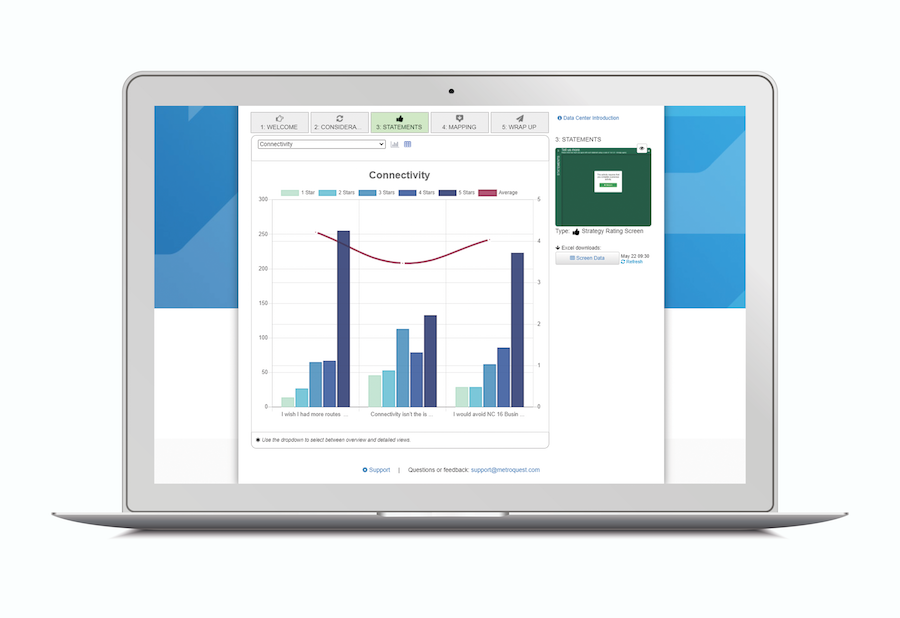
More insightful – with a refreshed Data Center so you can get near real-time reports on participant activity and responses in both graphical and tabular formats
Building a Tool for Planners
The feedback we have received on MetroQuest 2020 to date has been really encouraging. Those building surveys are really pleased with the added flexibility and independence that the new MetroQuest provides. They are finding that they can more efficiently create the surveys that best support their projects.
The new Image Library makes it so much easier to find the images you want and to crop or re-size them with a click of a button to meet your needs. Map management is also dramatically improved, with the ability to easily center a map in the Map Marker screen. The new Data Center with its new charting system makes analyzing and reporting on survey results much easier, timely and graphical, with improved spreadsheet download capabilities. And that is just a highlight of a few of the changes we made since we declared MetroQuest 2020 released this past fall!
Since then, we have focused on taking MetroQuest even further in our objective of enabling you to create delightful surveys that engage record numbers of online participants. Our focus has been on continuing to provide you with the tools to create truly engaging surveys, technology to better understand and analyze survey results and streamline the entire survey lifecycle.
Highlight of New Capabilities in MetroQuest 2020
Embed Video in Surveys via YouTube
Did you know that you can now embed YouTube videos into your screens with the click of a button? Available on any screen with rich text content, this option dramatically enhances the survey experience and information exchange with your survey participants.
Automatic Survey Launch and End
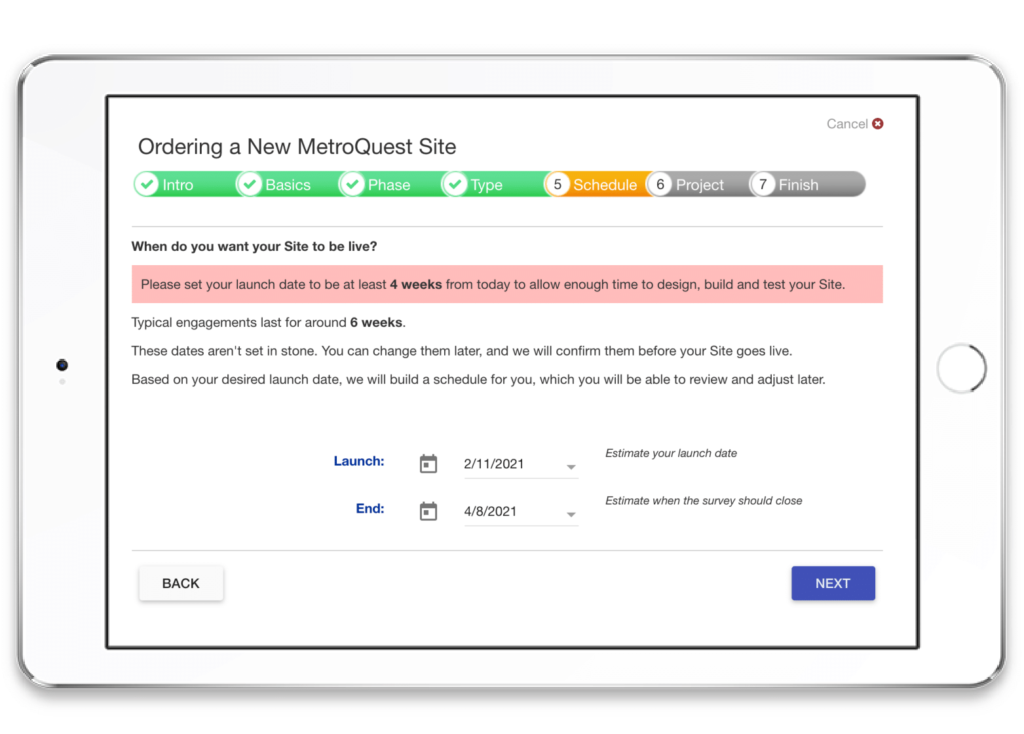
You can now set the Survey Launch and Survey End times in the Create Survey tab in Studio! No need to ask us to do it for you. Surveys will automatically begin to accept data based on the date that you set. The Launch and End times will also be displayed on the Project Overview page in Studio. We’ve also built in the requisite buffer time for Pre-Launch checks to ensure that your survey launches without any issues.
Word Cloud and Sentiment Analysis
As part of our Data Center updates, MetroQuest 2020 introduces Word Cloud and Sentiment Analysis: two new ways of representing participant data with compelling visuals. Word Cloud is a visual representation of word frequency. The more the term appears within the survey question, the larger the word appears in the image – thereby giving you a visual on the key words your participants were using. Sentiment Analysis will also help you gauge public opinion by providing visual feedback as to whether the participant responses are positive, negative, or neutral.
Survey Template Library
One super-exciting development is the new Survey Template Library. This Library offers templates for the most popular types of surveys. Each template uses a combination of screens based on the most frequently used screens for the respective topic, type of project and project phase. Each screen is prepopulated, complete with the appropriate images, text, and other relevant content based on best practices and example surveys of the same type.
In the near future, the library will boast more search functionality to allow survey creators to browse more easily, as well as copying and editing templates to create your own surveys faster!
The library is still under development. Subscribers can currently view the library in “Preview Mode” and provide comments to our Product team.
These are just some of our newest feature releases to kick off the year. Stay tuned. We have plenty more work to do in 2021!